WebPage: iOS 26’s Headless, Observable Browser — No UIKit Required
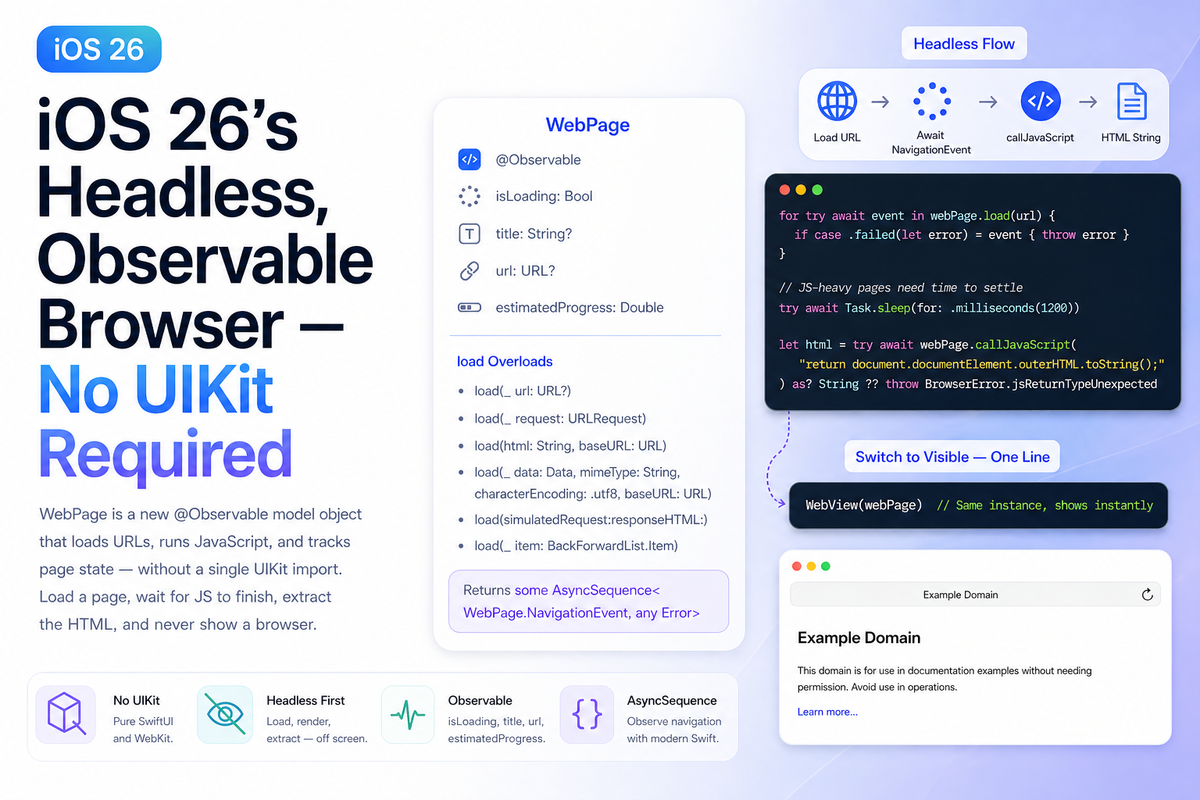
Most apps that need to load a web page reach for WKWebView wrapped in a UIViewRepresentable — a layer of UIKit glue that was never pleasant to write and became less defensible with every SwiftUI release. iOS 26 ships a cleaner answer: WebPage, a fully @Observable model object that loads URLs, executes JavaScript, and tracks page state with no UIKit import anywhere in sight.
What makes WebPage genuinely useful, though, is that showing a visible browser is optional. You can load a URL, wait for JavaScript to finish rendering the DOM, pull the HTML string, and never put a pixel on screen. On-device scraping, AI tool pipelines, link previews, background prefetching — all of these just got significantly simpler.
How WebPage Works
WebPage is a model object, not a view. It lives in your @State or @Observable model layer, and you attach a WebView to it only when you actually want the user to see the page. The same instance drives both the headless and visible paths — switching between them is one line of code.
Key observable properties:
isLoading—Bool, flips tofalsewhen the initial load completestitle— the page's<title>element, updated in real timeurl— the current URL, including any redirectsestimatedProgress—Doublefrom 0.0 to 1.0, suitable for progress indicators
Key load overloads — use the simplest one that fits your needs:
load(_ url: URL?)— the common case; pass a plainURLload(_ request: URLRequest)— when you need headers, cache policy, or timeout controlload(html: String, baseURL: URL)— render a local HTML string directlyload(_ data: Data, mimeType: String, characterEncoding: .utf8, baseURL: URL)— load arbitrary dataload(simulatedRequest:responseHTML:)— simulate a server response, useful for testingload(_ item: WebPage.BackForwardList.Item)— navigate within the back/forward history
Every overload returns some AsyncSequence<WebPage.NavigationEvent, any Error> — you iterate that sequence to observe navigation progress rather than polling isLoading.
The Headless Pattern
Here is a complete, self-contained example that loads a URL, awaits navigation completion via NavigationEvent, then extracts the full rendered HTML — without ever displaying a browser.
import SwiftUI
import WebKit

@available(iOS 26.0, macOS 26.0, *)
@Observable
@MainActor
final class HeadlessBrowser {
    private var webPage = WebPage()
    private(set) var extractedHTML: String?

    func fetchRenderedHTML(from url: URL) async throws -> String {
        // Iterate navigation events — the sequence completes when loading finishes
        for try await event in webPage.load(url) {
            if case .failed(let error) = event { throw error }
        }

        // Give JS-heavy SPAs a moment to settle after the load event fires
        try await Task.sleep(for: .milliseconds(1200))

        guard let html = try await webPage.callJavaScript(
            "return document.documentElement.outerHTML.toString();"
        ) as? String else {
            throw BrowserError.jsReturnTypeUnexpected
        }

        extractedHTML = html
        return html
    }

    // Use URLRequest when you need custom headers or cache policy
    func fetchWithRequest(_ request: URLRequest) async throws -> String {
        for try await event in webPage.load(request) {
            if case .failed(let error) = event { throw error }
        }
        try await Task.sleep(for: .milliseconds(1200))
        return try await webPage.callJavaScript(
            "return document.documentElement.outerHTML.toString();"
        ) as? String ?? ""
    }

    enum BrowserError: Error {
        case jsReturnTypeUnexpected
    }
}
Usage from a view — @State works directly with @Observable classes, no @StateObject needed:
@available(iOS 26.0, macOS 26.0, *)
struct ContentView: View {
    @State private var browser = HeadlessBrowser()
    @State private var html: String?

    var body: some View {
        Button("Fetch Page") {
            Task {
                html = try? await browser.fetchRenderedHTML(
                    from: URL(string: "https://example.com")!
                )
            }
        }
        // To add a visible browser later - zero changes to the model:
        // WebView(webPage)
    }
}
Edge Cases and Gotchas
1. The navigation sequence ends before JavaScript finishes
load returns an AsyncSequence that completes when WebKit fires its load event — not when JavaScript finishes executing. Single-page apps (React, Vue, Next.js) routinely fire their load event and then spend another second populating the DOM. The settle delay above is not a hack — it is the correct approach for JS-heavy pages. For production use, poll for a specific DOM marker instead:
// More reliable than a fixed sleep for SPAs
let isReady = try await webPage.callJavaScript(
    "return document.querySelector('#app [data-loaded]') !== null;"
) as? Bool ?? false
2. callJavaScript return type is Any?
The returned value bridges JavaScript types to Swift: Number becomes Double, Boolean becomes Bool, objects become [String: Any]. Always unwrap with as?, never as!.
3. Use URLRequest only when you need it
load(_ url: URL?) is the right default. Reach for load(_ request: URLRequest) only when you need custom headers, a specific cache policy, or a non-default timeout. Passing a URLRequest for a plain GET adds no benefit.
4. App Store scraping policy
WebPage renders through the same WebKit engine as Safari — it is not a networking workaround. Even so, scraping a third-party site without user intent or consent can conflict with App Review guideline 4.2 and the target site's terms of service. Use this API for content the user explicitly requests or content your app owns.
5. Memory: hold WebPage at model scope, not inside a view
Because WebPage is @Observable, declaring it as @State directly inside a view body causes SwiftUI to re-subscribe on every render. Declare it at the model layer so the lifecycle is stable.
Showing the Browser When You Need It
If your flow starts headless and later needs to surface the page to the user, you do not need a second WebPage instance or a new load. Add WebView to your view hierarchy, pass the same instance, and the rendered page appears immediately:
// Somewhere in your view hierarchy
WebView(webPage)
    .frame(height: 400)
This works because WebPage and WebView are separated by design. The model holds all state; the view is just a presentation layer you opt into.
Summary
WebPage is the cleanest API Apple has shipped for web content since WKWebView replaced UIWebView. It removes the UIKit dependency, makes page state observable with zero boilerplate, and exposes navigation as an AsyncSequence you iterate rather than a delegate you implement. The main gotcha is that the sequence completing does not mean JavaScript has finished — build in a settle delay or poll for a DOM marker when targeting JS-heavy pages.