ContainerValues: Per-Item Customization in SwiftUI Containers
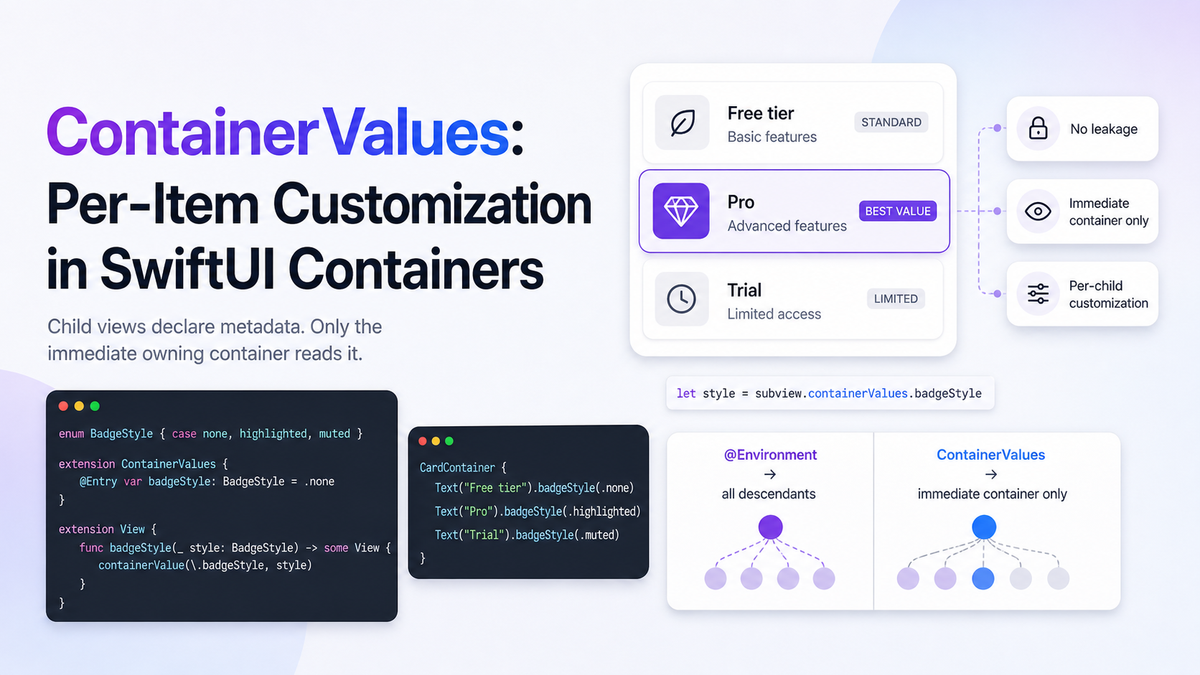
If you've ever needed one child view in a SwiftUI container to look or behave differently from its siblings, you've probably reached for @Environment — and paid the price. Environment values propagate to every descendant in the subtree, not just the direct children of your container. Set a tint color on a parent and every nested view picks it up, even the ones you didn't intend to affect.
iOS 18 introduced ContainerValues, a keyed storage system designed specifically for this problem. Values are scoped to the container that reads them: children can stamp whatever metadata they want onto themselves, and only the immediate owning container sees it. Nothing bleeds sideways, nothing leaks downward.
The Core Idea
Think of ContainerValues as per-subview annotations. A child view declares its intent — "I want a highlighted badge", "render me as compact" — using a modifier backed by a container value. The container reads that declaration when it lays out the child, and acts on it. Consumers of the container never see the value.
The contrast with @Environment is precise:
- Environment: pushed down from a parent, read by any descendant at any depth.
- ContainerValues: declared by a child, read only by the one container that directly owns that child.
Declaring a Container Value
Extend ContainerValues using the @Entry macro — the same macro that handles EnvironmentValues, FocusValues, and Transaction. No separate key struct needed.
import SwiftUI

// 1. Declare the value type
enum BadgeStyle { case none, highlighted, muted }

// 2. Register it on ContainerValues
extension ContainerValues {
    @Entry var badgeStyle: BadgeStyle = .none
}

// 3. Expose it as a View modifier for call-site ergonomics
extension View {
    func badgeStyle(_ style: BadgeStyle) -> some View {
        containerValue(\.badgeStyle, style)
    }
}
The containerValue(_:_:) modifier attaches the value to the view within a container context. Its signature:
func containerValue<T>(
    _ keyPath: WritableKeyPath<ContainerValues, T>,
    _ value: T
) -> some View
Reading Values Inside a Container
Custom containers use ForEach(subviewOf:) or Group(subviewsOf:) to iterate their resolved subviews. Each resolved subview exposes a containerValues property.
struct CardContainer<Content: View>: View {
    @ViewBuilder let content: Content

    var body: some View {
        // ForEach(subviewOf:) iterates one subview at a time
        VStack(spacing: 12) {
            ForEach(subviewOf: content) { subview in
                let style = subview.containerValues.badgeStyle
                CardView(badgeStyle: style) {
                    subview
                }
            }
        }
    }
}

// Usage — each child carries its own badge intent
CardContainer {
    Text("Free tier").badgeStyle(.none)
    Text("Pro").badgeStyle(.highlighted)
    Text("Trial").badgeStyle(.muted)
}
Each card reads its own value. A .highlighted badge on the "Pro" row has no effect on "Free tier" or "Trial" — not even via a shared ancestor.
When You Need to Know the Total Count
Group(subviewsOf:) collects all resolved subviews as a SubviewsCollection before you iterate. Use this when the container's layout depends on how many children are present — for example, switching to a compact style when there are more than ten items:
struct AdaptiveGrid<Content: View>: View {
    @ViewBuilder let content: Content

    var body: some View {
        Group(subviewsOf: content) { subviews in
            let compact = subviews.count > 10
            LazyVGrid(columns: compact ? [GridItem(), GridItem()] : [GridItem()]) {
                ForEach(subviews) { subview in
                    subview
                        .padding(compact ? 4 : 12)
                }
            }
        }
    }
}
Edge Cases and Gotchas
1. ContainerValues don't propagate to nested containers
This is intentional, but it bites people. If CardContainer contains another custom container inside one of its cards, the inner container cannot read values declared for the outer one. Each container only sees values applied directly to its immediate subviews.
2. A single ForEach resolves to N subviews, not one
CardContainer {
    ForEach(items) { item in  // This resolves to items.count subviews
        Text(item.title).badgeStyle(item.badge)
    }
}
ForEach(subviewOf:) inside the container will iterate each resolved child independently. This is usually what you want — but if you're counting views or computing layout from subviews.count, remember that one ForEach in the caller can produce many resolved subviews.
3. Don't use @Environment when you mean ContainerValues
The symptom: a modifier you applied to one card affects the nested views inside a completely different card. That's an environment value leaking through the tree. If the customization is meant for one container-child relationship only, it belongs in ContainerValues, not @Environment.
4. Resolved subviews are immutable — apply modifiers in the container
You cannot reach into a resolved subview and mutate it after extraction. Any styling that depends on container logic (spacing, color, scale) must be applied in the container's body, wrapping the subview:
// Correct — wrap, don't mutate
CardView(badgeStyle: style) { subview }

// Won't compile — subview is not a mutable View
subview.badgeStyle(.highlighted)  // ❌
5. @ViewBuilder is required on the content parameter
If you omit @ViewBuilder from the container's content parameter, conditionals and ForEach inside the caller break. Always declare the content closure with @ViewBuilder.
Practical Use Cases
- Card grids — per-card visual variants (highlighted, muted, locked) without polluting
@Environment - Custom tab bars — each tab declares its icon, label, and badge count; the tab bar reads them without the views needing to know about each other
- Stepped forms — each step declares whether it's required, optional, or completed; the form container uses that to render a progress indicator
- Adaptive layouts — containers that switch between list, grid, and compact modes based on item count or per-item size hints
Summary
ContainerValues solves a specific problem that @Environment handles poorly: per-child customization inside a reusable container. Declare values with @Entry, apply them with containerValue(_:_:), and read them inside ForEach(subviewOf:) or Group(subviewsOf:). The scoping guarantee — values are only visible to the immediate owning container — keeps your view hierarchy predictable and prevents the accidental side-effects that come with environment propagation.