visualEffect in SwiftUI: Scroll-Driven Effects Without GeometryReader Breaking Your Layout
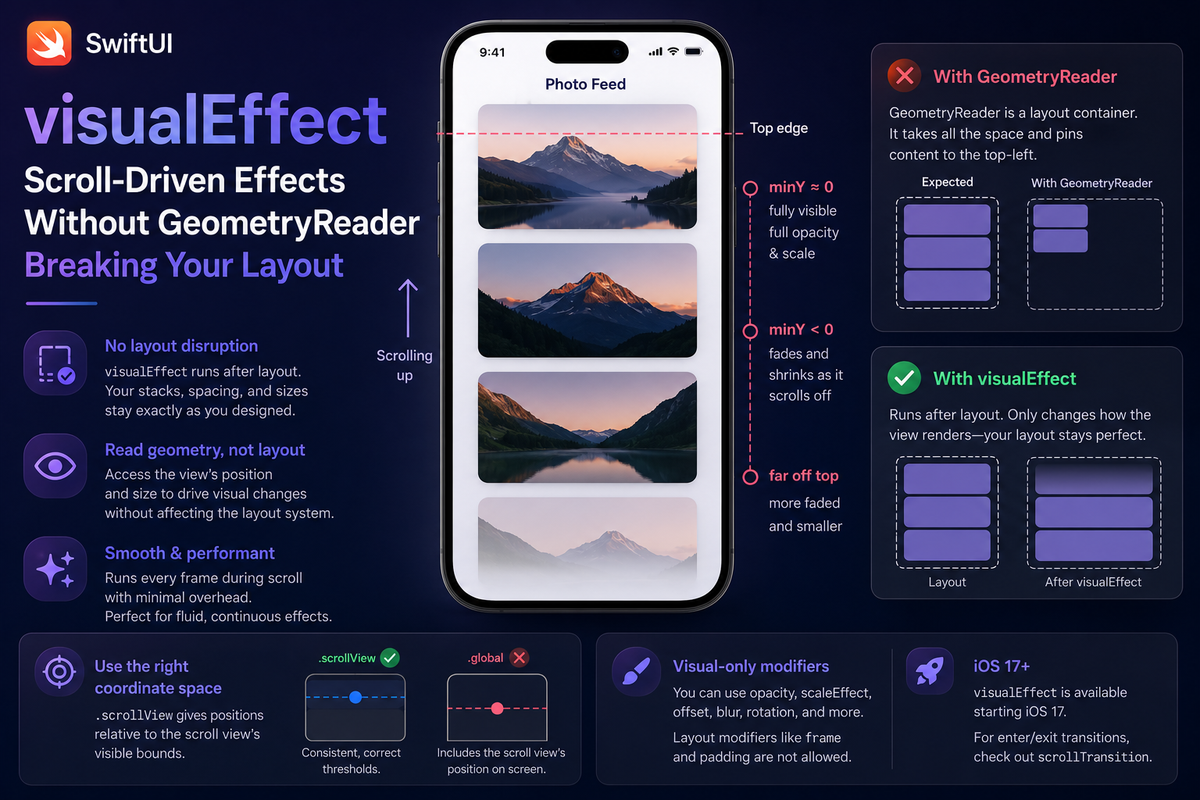
You want a photo to fade and shrink as it scrolls off the top of the screen. The instinct, drilled in by years of SwiftUI tutorials, is to wrap it in a GeometryReader, read the frame, and drive the effect from there. Then your layout falls apart: the cards collapse toward the top-left, the spacing is wrong, and you end up papering over it with fixed .frame heights. GeometryReader didn't misbehave — it did exactly what it's designed to do.
GeometryReader is a layout container. It accepts all the space its parent offers and pins its children to the top-left, which is why dropping one into a stack rearranges everything around it. For scroll-driven visual effects you want none of that — you want to read a view's position and change how it renders, nothing more. That is exactly what visualEffect does, and it has been available since iOS 17.
visualEffect runs after layout
The key difference is timing. GeometryReader participates in the layout pass. visualEffect runs after layout is resolved: the view is already sized and placed, and the modifier hands you its final geometry so you can adjust appearance without feeding anything back into the layout system. No wrapper view, no preference keys, no extra layout pass.
The modifier takes a closure with two arguments — an empty visual effect to build on, and a GeometryProxy for the view being modified. You return a chain of visual-only modifiers:
import SwiftUI

struct Photo: Identifiable {
    let id = UUID()
    let name: String
}

struct PhotoFeed: View {
    let photos: [Photo]

    var body: some View {
        ScrollView {
            LazyVStack(spacing: 20) {
                ForEach(photos) { photo in
                    PhotoCard(photo: photo)
                        .frame(height: 220)
                        .visualEffect { content, proxy in
                            // Position relative to the scroll view's visible bounds.
                            let minY = proxy.frame(in: .scrollView).minY
                            // React only once the card crosses above the top edge.
                            let offset = min(minY, 0)
                            return content
                                .opacity(1 + offset / 220)              // fade on the way out
                                .scaleEffect(1 + offset / 1200, anchor: .top)  // shrink slightly
                        }
                }
            }
            .padding()
        }
    }
}

struct PhotoCard: View {
    let photo: Photo

    var body: some View {
        RoundedRectangle(cornerRadius: 16)
            .fill(.blue.gradient)
            .overlay(Text(photo.name).foregroundStyle(.white))
    }
}
Reading proxy.frame(in: .scrollView) gives the card's frame relative to the enclosing scroll view's visible bounds. At the top edge minY is roughly zero; as the card scrolls up and out, minY goes negative. Clamping with min(minY, 0) keeps the card at full opacity and scale until it crosses the top, then fades and shrinks it on the way out. The whole effect is one chained modifier.
Only visual modifiers compile here
The closure's return type conforms to the VisualEffect protocol, and the compiler enforces it. You can return opacity, scaleEffect, offset, rotationEffect, rotation3DEffect, blur, brightness, contrast, saturation, grayscale, and hueRotation — anything that changes pixels without changing the frame. Anything that touches layout is simply unavailable:
.visualEffect { content, proxy in
    content
        .opacity(0.5)         // visual — allowed
        .blur(radius: 4)      // visual — allowed
        .scaleEffect(0.95)    // draws scaled, frame unchanged — allowed
    // .frame(width: 100)     // does not compile — changes layout
    // .padding(20)           // does not compile — changes layout
}
This is the guarantee that keeps your layout stable. offset is allowed because it shifts where a view draws without changing the frame layout reserved for it; frame and padding are not, because they resize that reservation.
The gotcha: .scrollView, not .global
The single most common mistake is reaching for the wrong coordinate space. .global measures against the whole screen, so it folds the scroll view's own on-screen position into the number. The moment the scroll view isn't pinned to the top of the window — a navigation bar, a header, a sheet — your thresholds drift and the effect fires in the wrong place.
.visualEffect { content, proxy in
    // Wrong: .global includes the scroll view's own position on screen,
    // so thresholds drift behind a nav bar, header, or sheet.
    // let minY = proxy.frame(in: .global).minY

    // Right: .scrollView is relative to the scroll view's visible bounds.
    let minY = proxy.frame(in: .scrollView).minY
    return content.opacity(minY < 0 ? 0.4 : 1)
}
.scrollView resolves against the innermost scroll view's bounds, which is almost always the frame of reference you actually mean. Use it unless you have a specific reason not to.
It can read geometry, but not push it back
Because visualEffect runs after layout, it is a read-only window onto geometry. You cannot use the measured size to change the layout of other views — there is no way to route that value back. When you genuinely need a measured size to drive layout or state, that is a different job: reach for onGeometryChange on iOS 18, or a GeometryReader before it. And keep the closure cheap — it re-runs on every geometry change, which during a scroll means every frame, so it should compute transforms and nothing else.
One more boundary worth knowing: if all you want is a discrete enter/exit animation as views appear and disappear, scrollTransition (also iOS 17) is purpose-built for that. visualEffect is the continuous, general-purpose tool — it works anywhere a view has geometry, inside a scroll view or not.
Summary
GeometryReader rearranges your layout because it is a layout container; visualEffect doesn't, because it runs after layout and only changes how a view renders. Read proxy.frame(in: .scrollView), return visual-only modifiers, and you get clean scroll-driven fades, scales, and parallax in a single chained call. Save GeometryReader for when you truly need to feed a size back into layout — and reach for visualEffect the rest of the time.