SwiftUI View Identity: Why an If Statement Breaks Your Animations
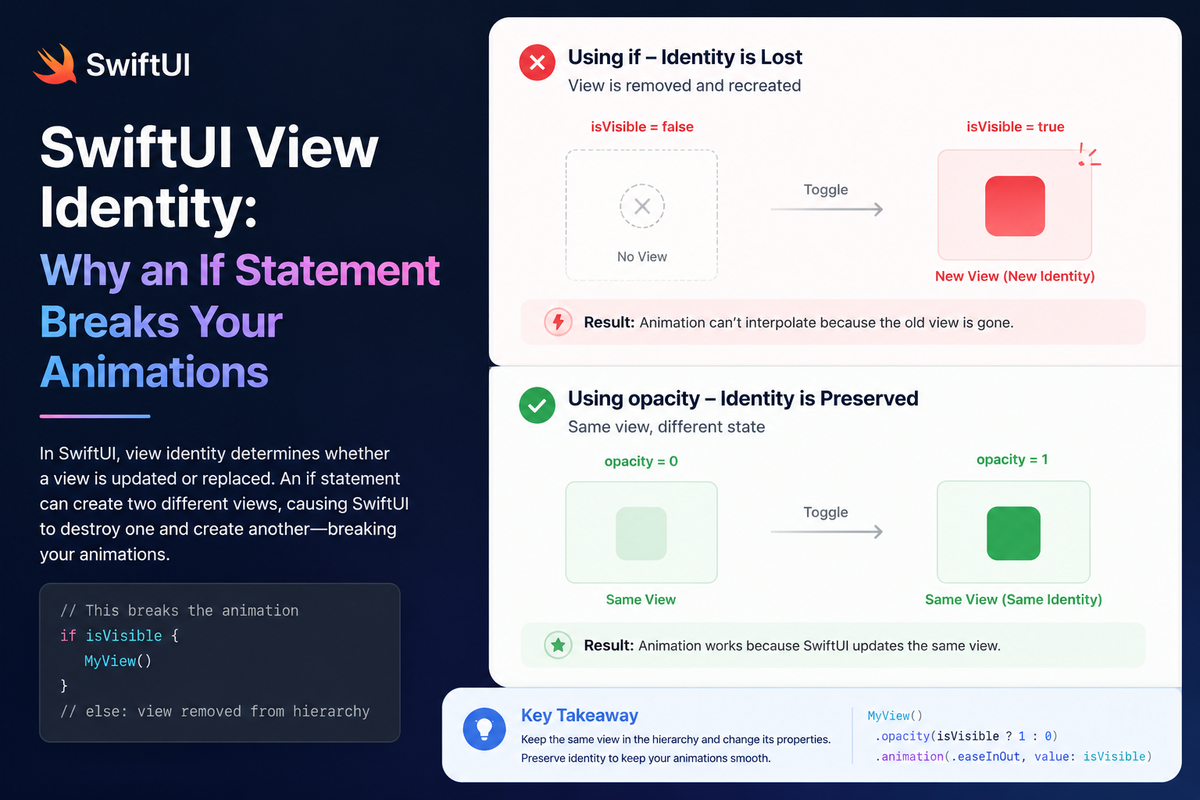
You add a conditional to a view — highlight a selected cell, dim an archived row — and reach for the tool every Swift developer knows: an if statement. The code compiles, the logic is correct, and yet the result is subtly wrong. The animation snaps instead of glides, or a text field forgets what the user typed the instant the condition flips. Because the code looks innocent, the bug feels like a SwiftUI quirk. It isn't — it's structural identity, and once you see it you can't unsee it.
SwiftUI doesn't track your views by reference — they're value-type structs that get thrown away and rebuilt on every render. To decide whether two renders are "the same view in a new state" or "a different view entirely," it relies on identity. Most of the time that identity is structural: inferred from where a view sits in your code. An if is the single most common way to accidentally hand SwiftUI two different identities for what you meant to be one view.
How an if splits one view into two
When you write an if/else inside a @ViewBuilder, SwiftUI doesn't produce one view that changes its appearance. It produces a _ConditionalContent value — an enum with a .first case and a .second case. Each branch is a structurally distinct view with its own slot in the identity tree.
// One view in two branches — but SwiftUI sees two identities.
struct CartButton: View {
    let isSelected: Bool
    let addToCart: () -> Void

    var body: some View {
        if isSelected {
            Button("Add to cart", action: addToCart)
                .background(Color.blue)
                .scaleEffect(1.05)
        } else {
            Button("Add to cart", action: addToCart)
                .background(Color.clear)
                .scaleEffect(1.0)
        }
    }
}
When isSelected flips, SwiftUI doesn't see "the same button with a different background." It sees the .first branch leave and the .second branch arrive. The outgoing view is torn down and the incoming one is built from scratch. Two consequences fall out of that:
- The background can't animate as a property, because there's no shared view to interpolate between. You get a transition (a fade/replace) instead of the smooth colour slide you wanted.
- Any state that lived inside the branch is destroyed.
@State,@FocusState, scroll position, an in-flight animation — all gone, because SwiftUI ties that state to the view's identity, and the identity just changed.
The fix is to stop branching the structure and branch the value instead. Keep one button and let the modifier arguments decide:
// One button, one identity. The arguments change, not the structure.
struct CartButton: View {
    let isSelected: Bool
    let addToCart: () -> Void

    var body: some View {
        Button("Add to cart", action: addToCart)
            .background(isSelected ? Color.blue : Color.clear)
            .scaleEffect(isSelected ? 1.05 : 1.0)
            .animation(.spring, value: isSelected)
    }
}
Now there's exactly one button with one identity. When isSelected changes, SwiftUI sees the same view with new arguments and interpolates between them — a real animation — and .animation(_:value:) scopes that animation to just this change.
The state-loss version is the dangerous one
The animation glitch is cosmetic. The state loss is a correctness bug, and it's easy to write by accident. Here a row highlights itself when selected — so the editable field gets wrapped in an if purely to attach one background:
struct ReminderRow: View {
    @State private var isSelected = false

    var body: some View {
        VStack(spacing: 16) {
            // The toggle lives right here, so the cause is visible.
            Toggle("Selected", isOn: $isSelected)

            if isSelected {
                ReminderField().background(Color.yellow)   // if branch
            } else {
                ReminderField()                            // else branch
            }
        }
        .padding()
    }
}

struct ReminderField: View {
    @State private var text = ""

    var body: some View {
        TextField("Reminder", text: $text)
            .textFieldStyle(.roundedBorder)
    }
}
Type something into the field, flip the toggle, and what you typed disappears. The ReminderField in the if branch and the one in the else branch are different identities, so flipping isSelected tears down one and builds the other with empty state. The highlight is just a background — exactly the kind of cosmetic tweak that belongs in a modifier argument, not a structural branch:
struct ReminderRow: View {
    @State private var isSelected = false

    var body: some View {
        VStack(spacing: 16) {
            Toggle("Selected", isOn: $isSelected)

            ReminderField()
                .background(isSelected ? Color.yellow : Color.clear)   // one identity — text survives
        }
        .padding()
    }
}
Gotchas worth knowing
"Inert values" aren't magic — identity is the whole story
A popular way to explain the fix is "pass Color.clear or 0 and SwiftUI detects the no-op and skips the work." That's not quite what happens. SwiftUI isn't pattern-matching your .clear. The reason the ternary works is that it preserves one identity, so there's a single view to animate. The "inert" value is simply whatever argument means off for that modifier — Color.clear for a background, 0 for padding, 1.0 for opacity:
Text("Hello")
    .padding(.top, showExtraSpacing ? 20 : 0)
    .opacity(isArchived ? 0.4 : 1.0)
The benefit comes from there being one view, not from the specific value you pass.
if is correct when you really do mean two different views
None of this makes if wrong. When the branches are genuinely different views — a loading spinner vs. a loaded list, an empty state vs. content — you want distinct identities, and pairing the if with .transition(...) is exactly how you animate their insertion and removal. The rule isn't "never branch." It's "don't branch when you meant one view wearing two looks."
Beware the .if { } helper
You'll find a popular extension floating around that lets you write .if(isSelected) { $0.background(.blue) }:
extension View {
    @ViewBuilder
    func `if`<T: View>(_ condition: Bool, transform: (Self) -> T) -> some View {
        if condition { transform(self) } else { self }   // two types become _ConditionalContent
    }
}
It's seductive, but it's the same trap with a nicer face: it returns one type in the true case and another in the false case, so SwiftUI sees _ConditionalContent and the identity churns anyway. Prefer a ternary on the argument; reach for a helper like this only for modifiers with no natural "off" value.
The ternary has to keep the type stable
A ternary fixes things only when both branches feed the same modifier with the same value type. isOn ? Color.red : Color.blue is fine; isOn ? someView.padding() : someView is not — that reintroduces two shapes and two identities. Keep the conditional on the data going into a modifier, not on whether the modifier exists.
Summary
SwiftUI animates views and preserves their state by identity, and an if in your view body quietly mints a new identity every time its condition flips — tearing down state and turning animations into transitions. Move the condition inside the modifier with a ternary and you keep one view, one identity, and the smooth, state-preserving behaviour you expected. Save the if for when you genuinely have two different views to show — and pair it with an explicit .transition when you do.