reorderable() and reorderContainer(for:): Native Drag-to-Reorder for Any SwiftUI Layout
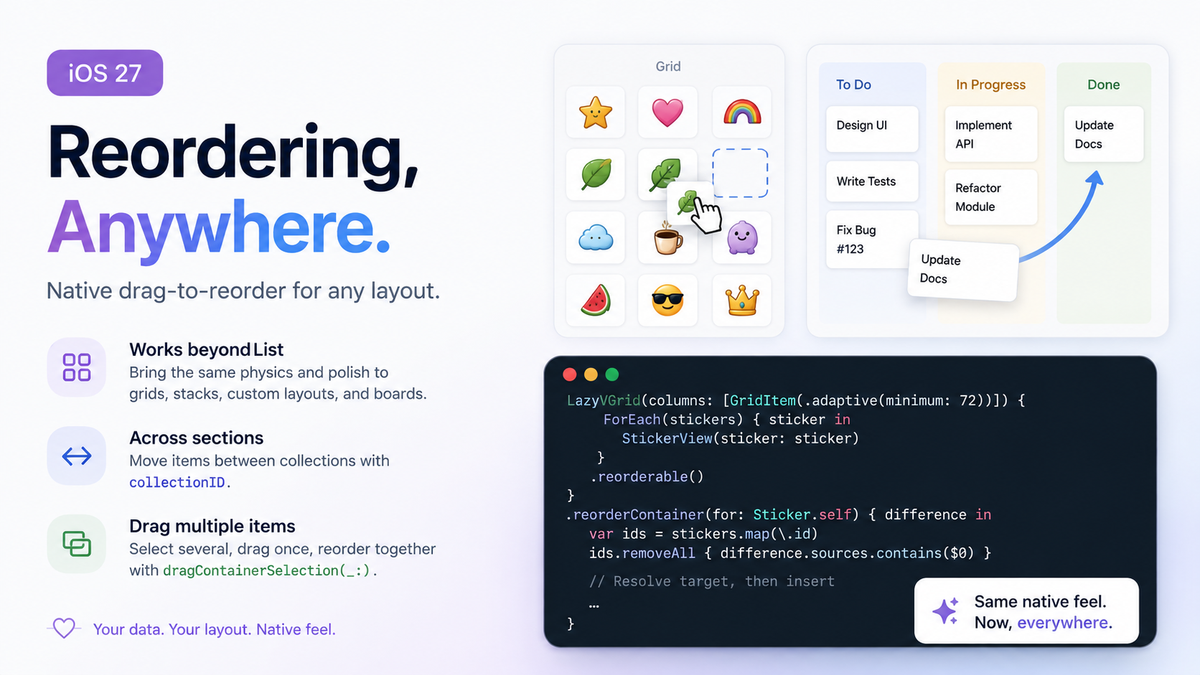
Reordering in SwiftUI has only ever really meant one thing: put your data in a List, attach .onMove(perform:), and accept the drag handle, the edit-mode chrome, and the row layout that comes with it. The moment your design called for a grid, a Kanban board, or anything built on LazyVGrid, LazyVStack, or a custom Layout, that native reordering disappeared. The usual fix was a hand-rolled solution: a custom ReorderableForEach wrapping onDrag/onDrop and a DropDelegate that tracked the active item, adjusted opacity mid-drag, and mutated the array by hand whenever the delegate detected you'd crossed into another item's frame. It worked, but it was boilerplate you had to babysit in every project that needed it.
iOS 27 closes that gap with two modifiers, reorderable() and reorderContainer(for:), that bring the same physics, drag preview, and drop animation List has always had to any layout your data actually lives in.
The basic pair: reorderable() and reorderContainer(for:)
reorderable() goes on the ForEach that produces your dynamic content. reorderContainer(for:) goes on the parent that owns the collection, and its trailing closure receives a ReorderDifference describing what moved and where it should land — your code is responsible for applying that to the model; SwiftUI only owns the gesture, the placeholder, and the animation.
struct Sticker: Identifiable, Hashable {
    let id: UUID
    var name: String
}

struct StickerBoard: View {
    @State private var stickers: [Sticker]
    private let columns = [GridItem(.adaptive(minimum: 72))]

    var body: some View {
        LazyVGrid(columns: columns) {
            ForEach(stickers) { sticker in
                StickerView(sticker: sticker)
            }
            .reorderable()
        }
        .reorderContainer(for: Sticker.self) { difference in
            var ids = stickers.map(\.id)
            ids.removeAll { difference.sources.contains($0) }

            let target: Int
            switch difference.destination.position {
            case .before(let id): target = ids.firstIndex(of: id) ?? ids.count
            case .end: target = ids.count
            }

            ids.insert(contentsOf: difference.sources, at: target)
            stickers.sort { ids.firstIndex(of: $0.id)! < ids.firstIndex(of: $1.id)! }
        }
    }
}
difference.sources is the set of IDs being dragged, and difference.destination.position is either .before(id) — insert ahead of that ID — or .end. The order matters: remove the sources from your working ID list first, then look up the target position, then insert. Compute the target before removing and a source item still sitting ahead of it will throw the index off by however many items you're moving.
Reordering across sections with collectionID
The single-collection case covers a lot, but boards, dashboards, and Shortcuts-style lists usually need items to move between groups, not just within one. For that, tag each ForEach with reorderable(collectionID:) and swap the container modifier for reorderContainer(for:in:), which adds a collectionID to the destination:
struct BoardTask: Identifiable, Hashable {
    let id: UUID
    var title: String
}

struct BoardColumn: Identifiable {
    let id: String
    var title: String
    var tasks: [BoardTask]
}

struct KanbanBoard: View {
    @State private var columns: [BoardColumn]

    var body: some View {
        HStack(alignment: .top, spacing: 16) {
            ForEach(columns) { column in
                VStack(alignment: .leading, spacing: 8) {
                    Text(column.title).font(.headline)
                    ForEach(column.tasks) { task in
                        TaskCard(task: task)
                    }
                    .reorderable(collectionID: column.id)
                }
                .frame(width: 220)
            }
        }
        .reorderContainer(for: BoardTask.self, in: String.self) { difference in
            apply(difference)
        }
    }

    private func apply(_ difference: ReorderDifference<BoardTask.ID, String>) {
        var moved: [BoardTask] = []
        for index in columns.indices {
            moved.append(contentsOf: columns[index].tasks.filter { difference.sources.contains($0.id) })
            columns[index].tasks.removeAll { difference.sources.contains($0.id) }
        }

        guard let destinationIndex = columns.firstIndex(where: { $0.id == difference.destination.collectionID }) else { return }

        var ids = columns[destinationIndex].tasks.map(\.id)
        let target: Int
        switch difference.destination.position {
        case .before(let id): target = ids.firstIndex(of: id) ?? ids.count
        case .end: target = ids.count
        }
        ids.insert(contentsOf: moved.map(\.id), at: target)

        let byID = Dictionary(uniqueKeysWithValues: (columns[destinationIndex].tasks + moved).map { ($0.id, $0) })
        columns[destinationIndex].tasks = ids.compactMap { byID[$0] }
    }
}
The shape of the diff logic is identical to the single-collection case — pull sources out first, resolve a target index, reinsert — the only new step is finding which column destination.collectionID points at before you touch its array.
Moving several items at once
For multi-select drags — think "select five photos, drag them all into a new album order" — dragContainerSelection(_:) marks which items in the container should travel together when any one of them is dragged, instead of requiring the user to drag one item at a time:
ForEach(stickers) { sticker in
    StickerView(sticker: sticker)
        .dragContainerSelection(selectedIDs.contains(sticker.id))
}
.reorderable()
difference.sources then contains every selected ID in one callback, and the same removal/insertion logic above handles it without any extra branching.
Edge cases and gotchas
Unstable IDs break the diff, not just the animation. reorderable() relies on the same Identifiable conformance ForEach always has. If your ID is derived from an array index instead of stable model data, SwiftUI can't tell "item moved" from "item replaced," and the reorder gesture misfires or animates the wrong element. This isn't new to reordering, but it bites harder here than in a static list.
Don't reach for DropConfiguration's destination: initializer for this. If you've read this blog's earlier piece on dropConfiguration, you'll recall DropConfiguration(operation:destination:) takes a ReorderDifference<ItemID, CollectionID>.Destination. It's tempting to think that's a shortcut into the reordering system from a dropDestination/dropConfiguration callback, but it's the other direction: it's how the reordering system itself reports live drop targets, not a general entry point for arbitrary collections. For a Kanban board where cards can be dropped from outside the reorderable set, dropDestination and your own @State are still the right tool; reorderable()/reorderContainer is specifically for dragging items that already live inside the container.
Summary
reorderable() and reorderContainer(for:) finally give LazyVGrid, LazyVStack, and custom layouts the native drag-to-reorder behavior that used to be exclusive to List, with collectionID covering cross-section moves and dragContainerSelection covering multi-item drags. The API hands you a ReorderDifference and gets out of the way — your job is just to remove the sources, resolve the target position, and reinsert, in that order, every time.